LLM Query
Sometimes you just want to ask your case a question. LLM Query lets you do exactly that - type a question in plain English and get an answer drawn directly from your case data. Whether you’re getting up to speed on a new case or hunting for a specific detail buried in your evidence, it’s a natural way to interact with your work.
Using LLM Query
Section titled “Using LLM Query”LLM Query is available in both graph view and list view.
Graph View
Section titled “Graph View”LLM Query in Graph View
Use the search bar at the top-center of the graph view. Switch to LLM Query mode using the right toggle option, type your question, and press Enter.
List View
Section titled “List View”LLM Query in List View
In list view, click the query button in the top-right toolbar to open the query panel. Type your question and press Enter to submit.
Reading Results
Section titled “Reading Results”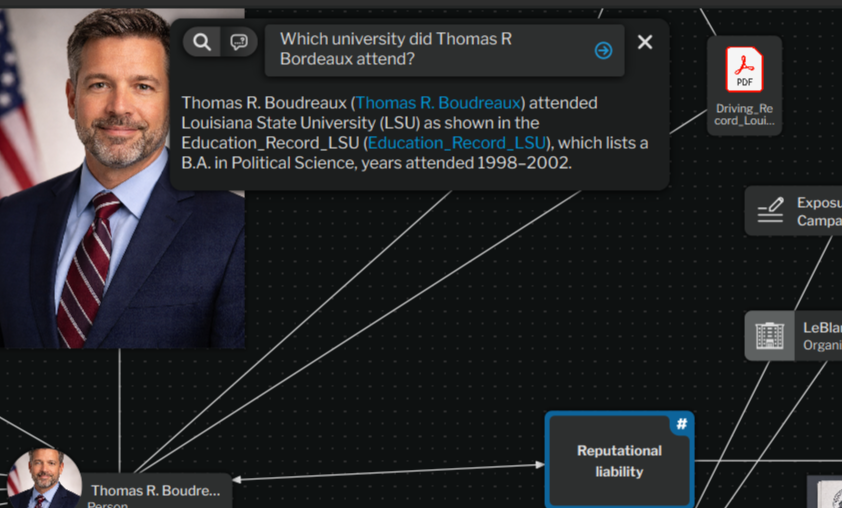
LLM Query Results
Answers appear as formatted text below the input. When the answer references specific nodes in your case, those references show up as clickable links that take you directly to the relevant node.
- Be specific with your questions for the best results - “What addresses are associated with John Smith?” will work better than just “addresses”.
- Answers are grounded entirely in your case data. The tool won’t pull in outside information or make assumptions.
- Use Shift+Enter to add a new line without submitting.
- Press Escape or click the X to dismiss the panel.