Spend Less Time Reconstructing. More Time Investigating.
Case material usually ends up scattered across browser tabs, downloads, shared folders and email. nQuest brings it into one case. Each source keeps its context, you can ask questions about the material you have collected, and you prepare the next finding from the same record.
- Pick up where you left off. Sources, notes and open questions stay together in the case.
- Ask questions about your material. Answers link back to the sources, so you can check them yourself.
- Pass work on with its context. The next person gets the question, the material behind it, and a note on what to do next.
Try nQuest free for 30 days. Onboarding and setup assistance included.
nQuest shows Owen’s supplied portrait beside Daniel’s field photograph. Selecting the 3 September observation opens its source card beside the photograph. Selecting the location finding closes the card and returns to the connected evidence.
Keeping a Case in Pieces Costs Time.
Come back to a case after a break and the first job is finding the material again. If a colleague takes over, they have to do the same.
Finding It Again
Which tab, download or folder holds the page you relied on? Is it still there?
Working Out Where Things Stand
What had you concluded, what was still open, and which lead did you already rule out?
Explaining It to Someone New
Briefing a colleague from memory because the reasoning lives in chat threads and sent mail.
Putting the Report Together
Assembling the report from fragments, then hunting each claim back to its source.
Pick Up Where the Work Stopped.
Investigations pause. Clients call weeks later. A colleague takes on part of the work while you are out. Restarting should not mean working out from scratch what happened and what comes next.
The Open Questions Stay Visible
Sources, observations, tasks and unanswered questions stay in the case, where you can see them together when you come back.
Contributions Return With Their Notes
On Team, ask a colleague to take on a defined piece of work. It comes back with a return note. One person edits the case file at a time.
See What Has Happened So Far
Case history and contribution notes record assignments, handoffs and progress, so the next person can read what happened instead of asking around.
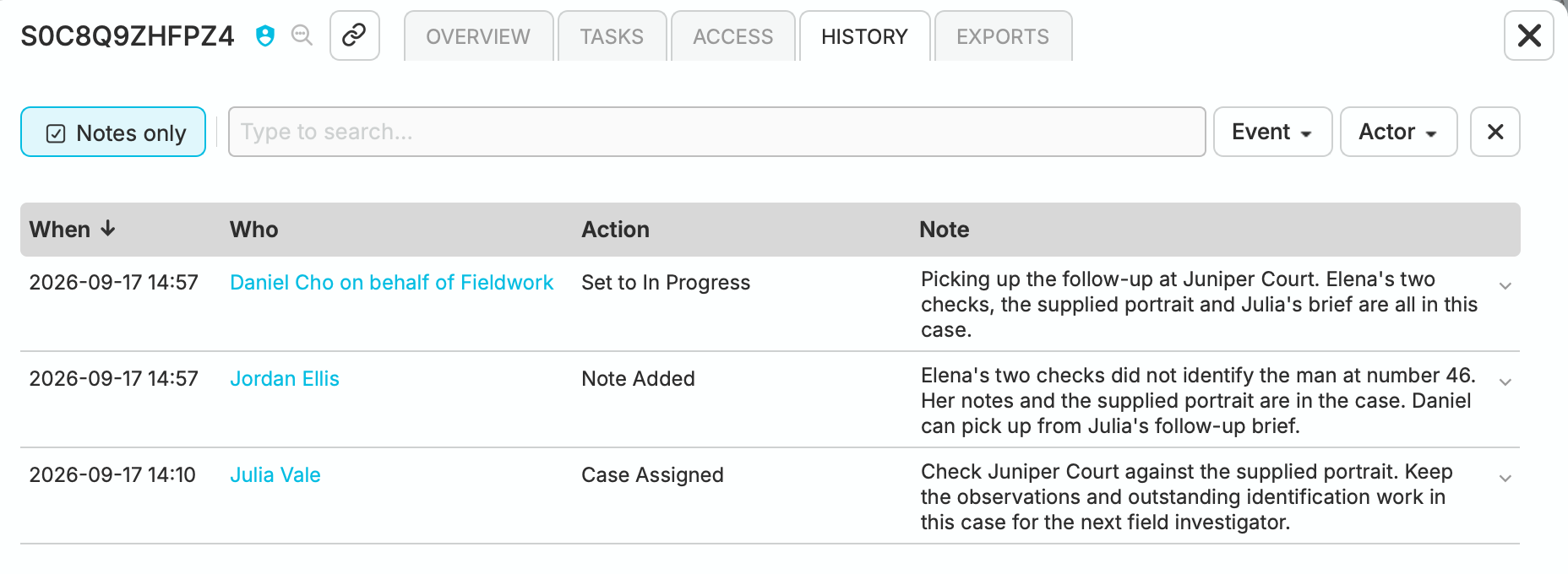
Follow an assignment, handoff note and pickup in the case history.
Ask the Case. Then Open the Source.
“What links the two appeal pages, and what is still unproven?”
Ask in plain language. nQuest answers from the material already in the case: captures, documents, exports and notes. Each answer links to its sources, so you can open them and check. It does not search the live web for you. Treat answers as work to check, not as findings.
Open a reference and read the source for yourself. A preserved page keeps its URL and collection time. If the material does not settle a question, say so in the case. The next inquiry can then start from work you have already checked.
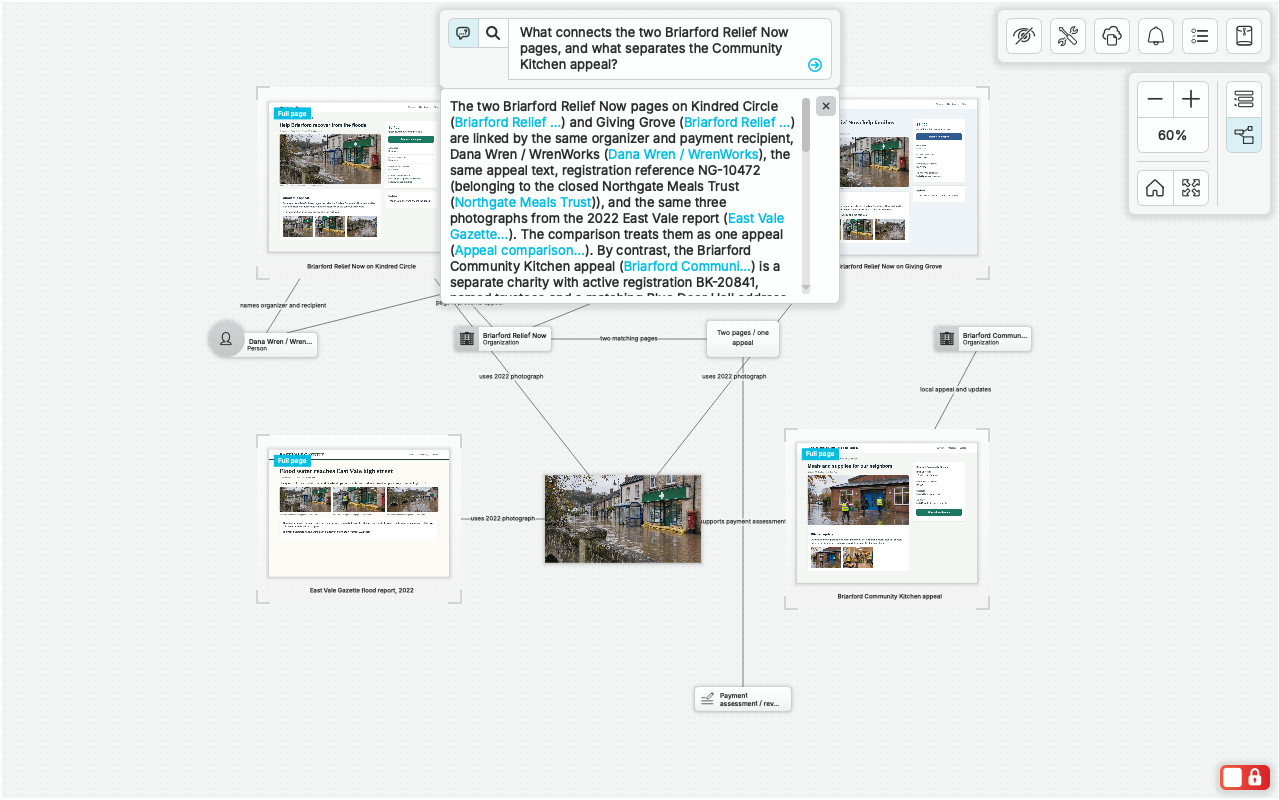
Ask how the collected pages connect, then follow the source links in the answer.
View full screenshot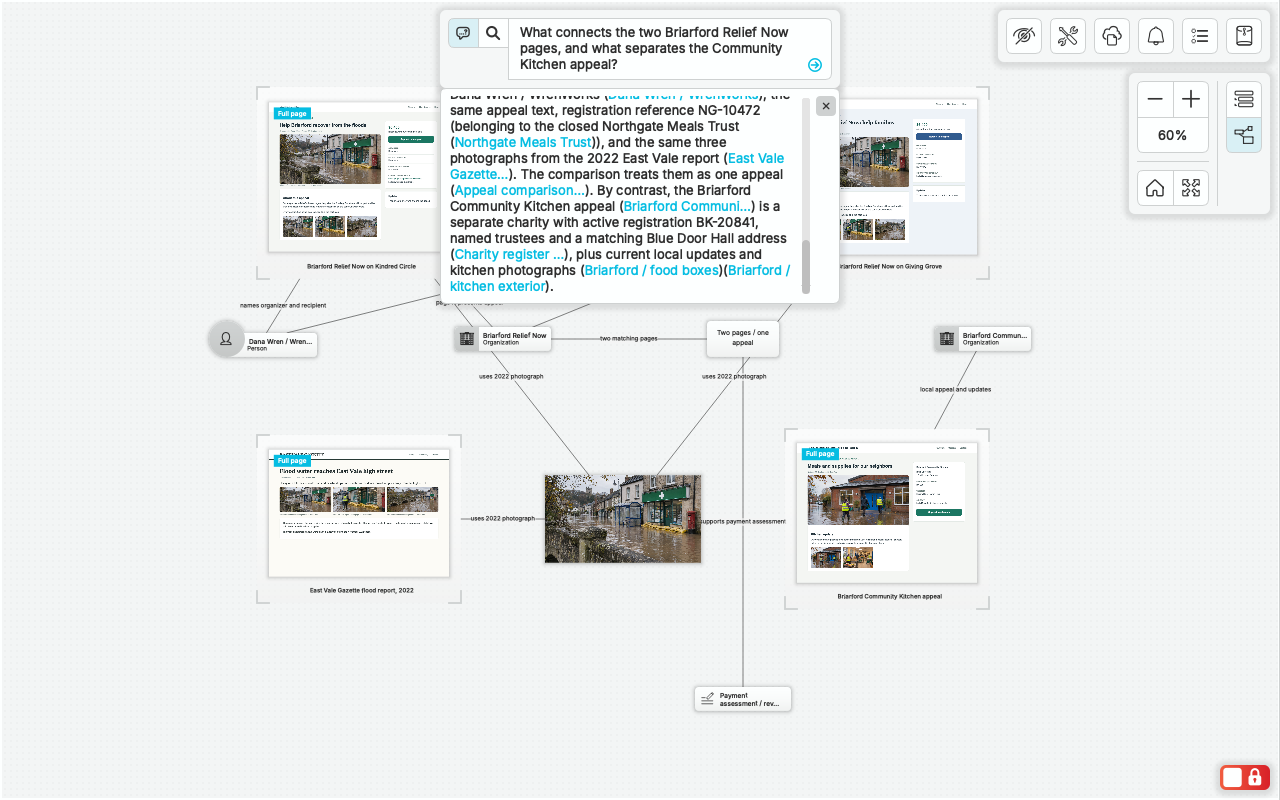
The answer separates connected pages from an unrelated appeal.
View full screenshot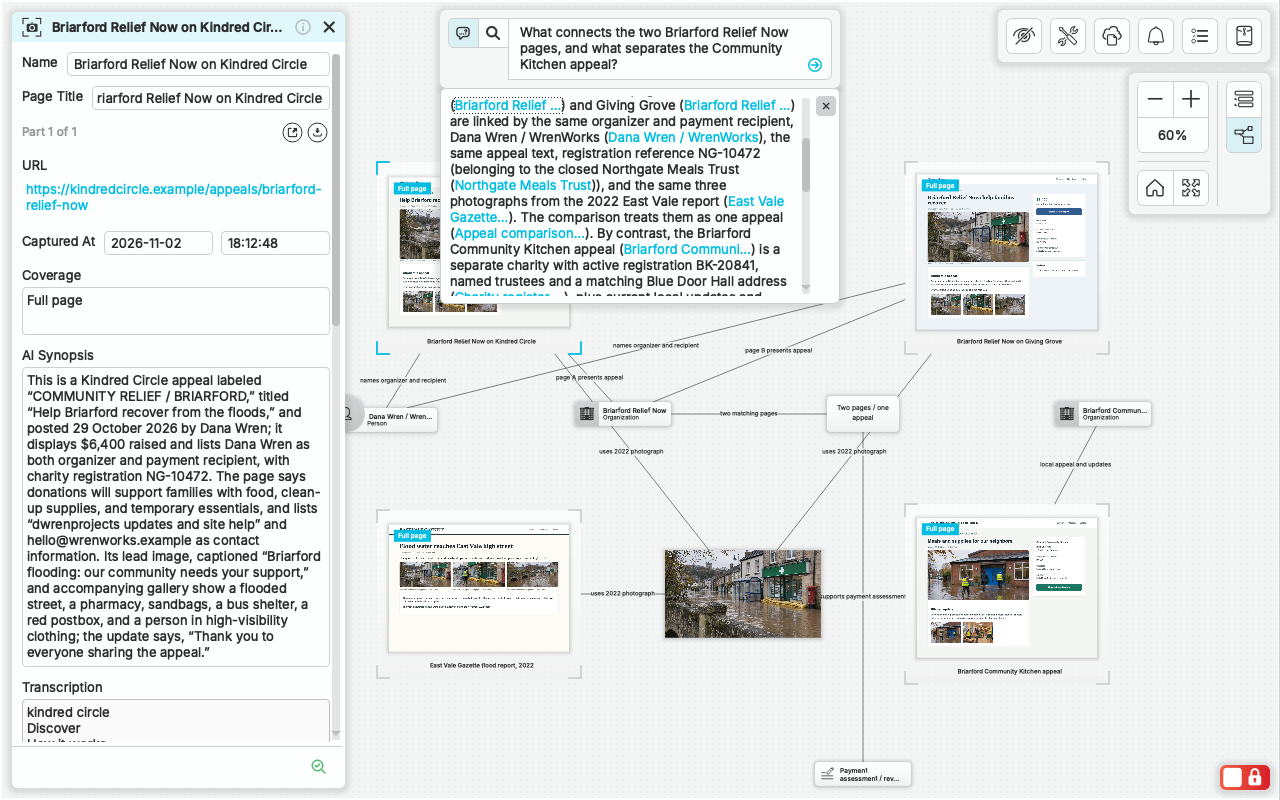
Scroll sideways to explore the whole view.
Follow a reference back to the collected source and its context.
View full screenshotHand Over More Than a Folder.
Sending someone a folder of files leaves them to work out what it all means. Hand over the case instead. They get the question, the material behind the finding, what is still open, and what needs doing next.
- Report draft. Draft an editable Word report (.docx) from the case material, then finish it in your own words.
- Supporting files. Export graph images and the supporting case files with the assessment.
- Review access. Reviewers can open the case read-only and inspect the same sources you relied on.
Westbridge incident · Handoff
“The ‘slipped’ description traces to Ben’s account, not an independent witness. Assessment ready for employer review.”
- Question
- Do the accounts agree on how Tessa was injured, and which descriptions are firsthand?
- Basis
- Incident and first-aid records, witness interview, camera review, and site check in one case.
- Limits
- Medical evidence establishes the injury; it does not by itself settle the disputed cause.
- Next step
- Review the assessment and both parties’ responses with the decision-maker.

Review the .docx draft, with source references and your own comments.
Keep the Tools That Find Things. Use nQuest to Work the Case.
You do not need to give up the services and systems that produce your material. nQuest is where that material comes together while you work on it. When you are finished, the finding and its supporting files go back out.
Stay where they are
- Your browser, research services, and record systems
- Client administration, billing, and contracts
- Queues and enforcement in your existing systems
- Final report editing in your word processor
Come together in nQuest
- Web captures with URL and collection time
- Exported reports, documents, photographs, and notes
- People, accounts, and relationships as they develop
- Questions, contributions, findings, and next steps
Leave when you are ready
Take out an editable report draft, graph images and supporting case files for clients and reviewers. You own your case data, with export access set out in the Terms.
Try It on an Assignment You Already Know.
Bring a small assignment into the trial: a few records, captures or notes you already understand. Use these four checks to judge whether nQuest fits how you work.
Follow a finding to its source
Ask a question you can already answer. Open every reference. The preserved source, not the answer text, should settle it.
Leave It for a Few Days
Close the case for a few days. When you come back, can you say what is open, what was ruled out, and what happens next, without reopening tabs or mail?
Hand Part of It to Someone Else
Give a colleague or reviewer the case, not a briefing call. Can they find the basis for the finding and the next task on their own?
Take the result out
Draft the report, export the supporting files, and check them as your recipient will receive them. Check that the limits and open questions are still clear in what they receive.
Questions Worth Asking.
Do I have to replace the tools I already use?
No. Keep your browser, research services, and record systems. Capture the pages you need and bring exported files, photographs, and notes into the same case, then take drafts and supporting files back out. See how nQuest fits your tools.
Is nQuest useful if I investigate on my own?
Yes. Capture sources, organize your case, search your research, and ask direct questions as an individual investigator. Start with Starter and move to Team when you need collaboration or custom entities. Compare the plans.
Do I need to design a complex case structure first?
Start with captures, files, and notes. Add relationships as the case develops. Team includes custom entity configuration for investigations that need shared fields and types.
What does the AI actually answer from?
Only the material collected in the case: captures, documents, notes, and records. Answers include source references to open and check. Case answers do not search the live web, and the AI can be wrong. Check the sources before you rely on an answer. Read how AI uses case data.
Can I get my work out of nQuest?
Yes. You own your case data under the Terms of Service. Export an editable Word draft, graph images, and supporting case or folder files during your term, with export access as set out in the Terms if you leave. See findings, reports & exports.
How does nQuest compare to OSINTracker?
nQuest brings browser capture, AI case answers, and collaboration into one investigation workspace. Our comparison covers the workflows, data handling, and export options of both tools. Compare nQuest and OSINTracker
Start Your Next Investigation in nQuest.
Start with a few sources from an assignment you know. Onboarding and setup assistance are included.